
Cockpit
The landing page after login: exposure score, key figures, Staff and Users categories, and filters that recompute the whole screen in one click.
The Cockpit at /cockpit is the default landing page after you sign
in. One screen answers four questions: who is exposed, where,
how the credentials leaked, and when. Every figure is clickable:
it filters the screen or opens the matching leaks.
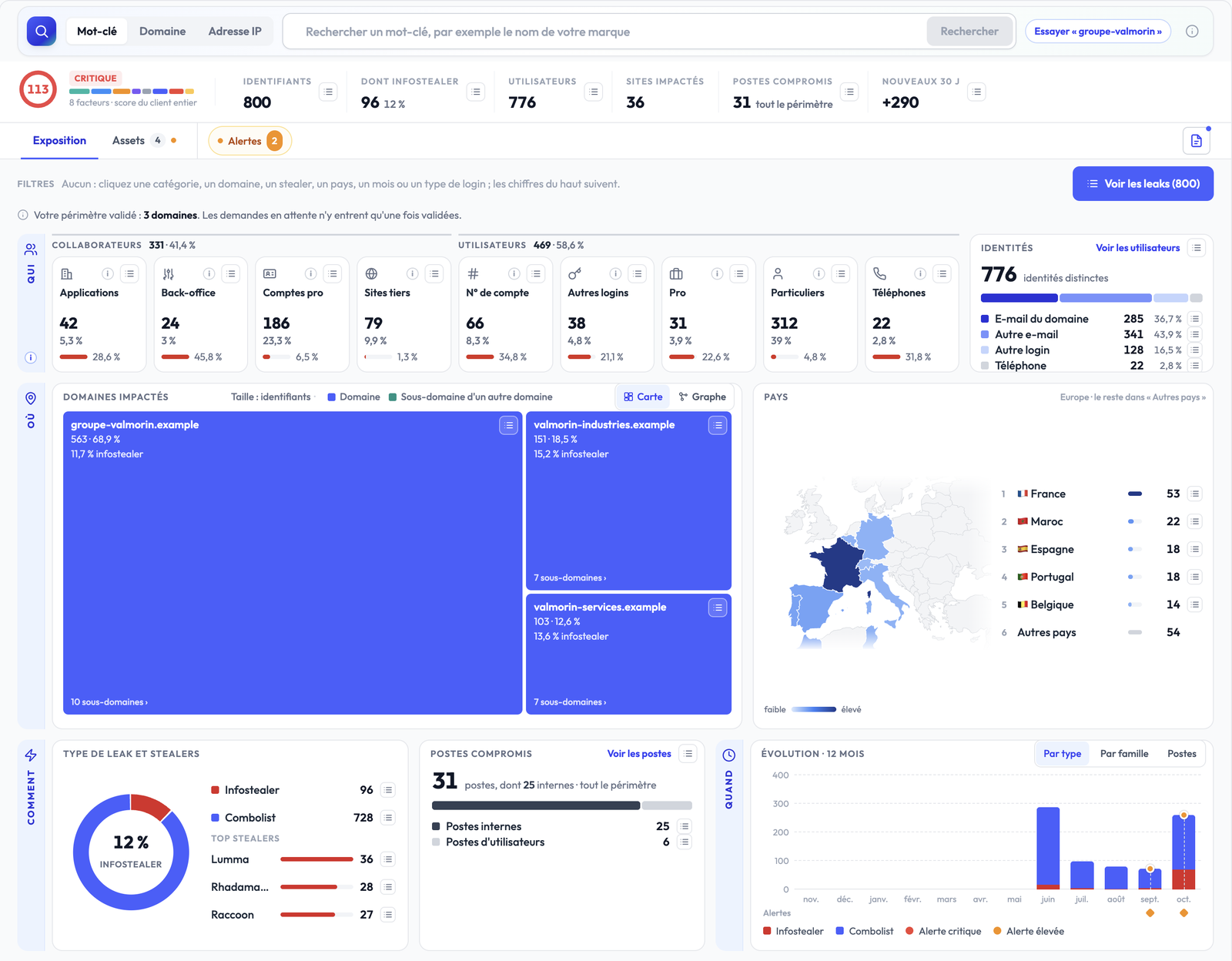
The search bar
At the top of the screen, the search bar has three modes: Keyword, Domain and IP address. Use it to analyse a name before adding it to your assets: you see its figures first, and nothing is monitored without your validation. The full flow is described in Assets.
The summary band
Below the search bar, one row of figures sums up your organisation's exposure:
| Figure | What it counts |
|---|---|
| Exposure score | A score over the whole perimeter, with its level (Low, Moderate, High, Critical). See below. |
| Credentials | The leaked credentials on your perimeter. |
| Of which infostealer | Those stolen by an infostealer, as a count and a share of the total. |
| Users | The exposed people (distinct identities). |
| Impacted sites | The sites these credentials were used on. |
| Compromised machines | The machines infected by an infostealer. This figure cannot be filtered by category: it covers the whole perimeter. |
| New 30 d | The credentials that appeared over the last 30 days. |
Each figure has a list icon that opens the matching leaks. When a filter
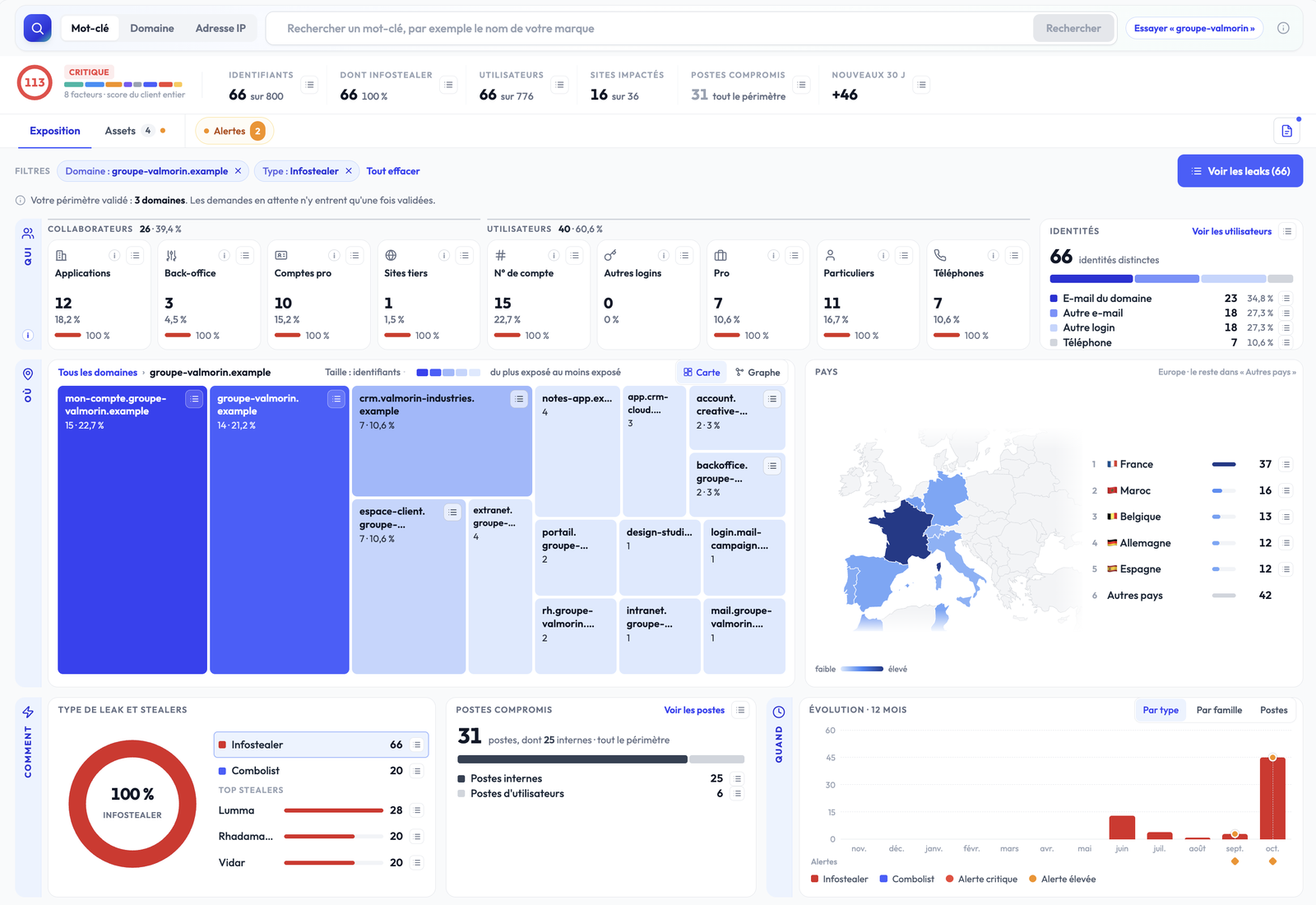
is active, figures read against the selection, for example 66 of 800.
The exposure score
The ring shows the score and its level, with the caption "8 factors · score of the whole client". The score always covers your whole perimeter: it does not follow the filters. Hover it to see the eight factors behind it.
The computation starts from a floor set by the worst signal present:
- 75 as soon as an employee machine is infected, that is a credential stolen by an infostealer in Internal applications, Enterprise accounts, Internal access and back-office or Third-party sites;
- 50 from 3 people in Enterprise accounts or Internal access and back-office, from 10 people with a domain e-mail, or from 10 infected users;
- 25 from one credential in Internal applications, 5 people affected or one infected user;
- 5 as soon as one person is affected.
The floors count people, not credentials: five credentials belonging to two employees are two people exposed. The volume of credentials then refines the position inside a band. Without an infected employee machine, the score never goes above 74.
The tabs
- Exposure: the default view, described in the rest of this page.
- Assets: your keywords, domains and IP ranges, with their count. See Assets.
- Alerts: a pill shows the number of open alerts. A click opens their list. See Create a monitor.
On the right, a button generates the organisation's PDF report.
Filter: the whole screen follows
The Filters bar states the principle: "click a category, a domain, a stealer, a country, a month or a type of login; the figures above follow".
- Every clicked element becomes a removable chip:
Domain: acme.com,Type: Infostealer,Category: Enterprise accounts... - Filters combine, and every figure on the screen is recomputed on the selection.
- Clear all removes every filter at once.
- The See the leaks (N) button opens the leak list for the same selection.
A line recalls your validated perimeter, for example "Your validated perimeter: 3 domains". Assets waiting for validation only join it once validated.
Who: Staff and Users
Every credential belongs to exactly one of nine categories, split into two families: Staff (the people of your organisation) and Users (the people who use your sites). Each category card shows the number of credentials, its share of the total and the share coming from infostealers. A click on a card filters the screen on that category.
The Identities card counts distinct identities, split by type of login: Domain e-mail, Other e-mail, Other login, Phone. See the users opens the list of exposed people.

The definition of each category is in Staff and users.
Where: domains and countries
- Impacted domains: a treemap where the size of each tile follows the
number of credentials. The colour tells your domains apart from
sub-domains of another domain (for example a portal of your brand
hosted by a provider). A click on a domain filters the screen and shows
its sub-domains, with a breadcrumb
All domains › acme.comto go back. - The Map / Graph toggle switches to a graph view that links domains to their sub-domains.
- Countries: a map and the ranking of the countries the credentials come from. Europe is shown, the rest is grouped under "Other countries". A click on a country filters the screen.
How: leak type and machines
- Type of leak and stealers: the split between infostealer and combolist, and the most frequent stealer families. A click on a stealer filters the screen.
- Compromised machines: the number of infected machines, split between internal machines (your employees') and users' machines. See the machines opens their list.
When: the 12-month evolution
The Evolution · 12 months chart shows new credentials month by month, with three views: By type, By family and Machines. Triggered alerts appear as markers under the months concerned. A click on a month filters the screen.
The leak list
The See the leaks button and every list icon open a side panel on the current selection:
- three tabs: Leaks, Users, Machines;
- the active filters, as chips;
- the columns username, category, masked password, host, type, stealer, country and first-seen date;
- a click on a row opens the leak sheet;
- pages of 25, 50 or 100 rows.
Reading details are in Reading detected leaks.
What's next
- Staff and users: the nine categories and what they change.
- Assets: analyse and add a keyword, a domain or an IP range.
- Create a monitor: get alerted on a category, a leak type or a domain.
Full onboarding guide
Walk through every step needed to get your Stealed organization production-ready: domains, keywords, team members, and your first monitor.
Staff and users
The two families and nine exposure categories: what each one holds, why they do not weigh the same, and how they drive the cockpit, the filters, the score and the alerts.